If you’ve ever landed on a Wikipedia article, maybe your own, your company’s, or a competitor’s, and wondered, “Who actually wrote this?”, you’re not alone. Knowing how to find the editor of a Wikipedia page can be useful for several reasons. You may want to verify whether a page was created by an experienced editor, investigate a potentially bad-faith edit, understand why a page keeps getting reverted, or perform due diligence before hiring someone to work on an article.
This guide explains how to find the editor of a Wikipedia page, step by step, and what you can learn from the information you find.
How to Find the Editor of a Wikipedia Page: Step by Step
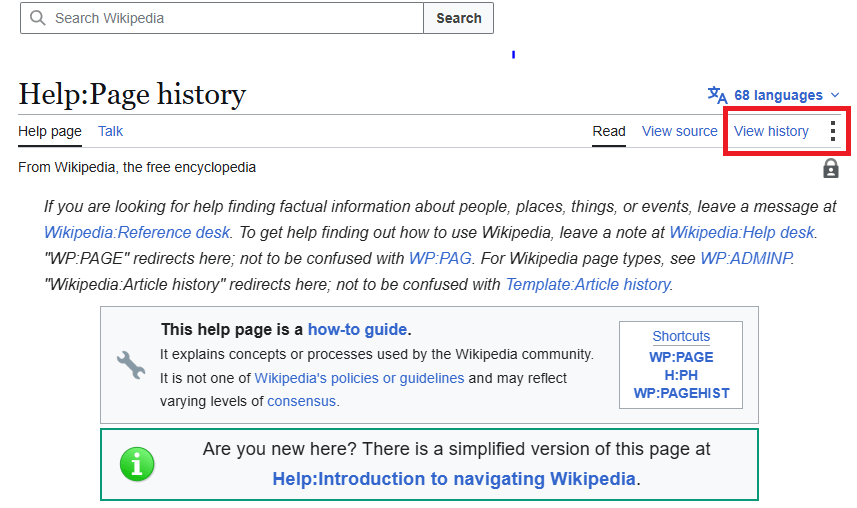
1. Open the “View History” Tab
Every Wikipedia article has a View history option. On desktop, it is normally located near the top of the article. On mobile, you may need to open the page’s menu to find it.
The history page records changes made to the article and identifies the account or IP address associated with each edit. Wikipedia’s Help:Page history documentation provides additional information about reading and comparing revisions.
2. Review the List of Contributors
The page history displays individual edits along with information such as:
- The username or IP address associated with the edit
- The date and time of the edit
- An edit summary explaining the change
- The approximate size of the change
Registered editors generally appear under usernames, while contributors who are not logged in may appear under an IP address.
3. Click on an Editor’s Username
Clicking an editor’s username can take you to their user page and contribution history. Their contributions can provide useful context about their activity on Wikipedia.
For example, you may discover that an account has contributed to many unrelated articles over several years. Alternatively, an account may have made most of its edits to one particular subject.
Keep in mind that an editor’s contribution history does not by itself establish their professional status, motives, or relationship with the subject of an article.
4. Check the Article’s Talk Page
Each Wikipedia article has an associated Talk page where contributors discuss proposed changes, sourcing problems, disputes, and other issues.
The Talk page can provide additional context when you are trying to understand why particular edits were made or reverted. It may also contain disclosures or discussions involving contributors who have a connection to the article’s subject.
5. Use the Page Information Tool
Wikipedia’s Page information tool provides additional metadata about an article. Depending on the page and interface, this can include information about the article’s creation date, number of revisions, and contributors.
This information can help you understand how actively an article has been maintained and how many people have contributed to it over time.
6. Look for Paid Editing Disclosures
If you believe an editor may have been paid to contribute to an article, check their user page and relevant article or Talk page discussions for disclosure information.
Wikipedia requires paid contributors to disclose their employer, client, and affiliation in accordance with its terms of use. Paid editing is also subject to Wikipedia’s conflict-of-interest rules and other applicable policies.
A disclosure can help you understand the relationship between an editor and the subject of an article, but the absence of an obvious disclosure does not automatically prove that an editor was unpaid or independent.
Why People Search for the Editor of a Wikipedia Page
There are several common reasons someone may want to identify the editors who have contributed to a Wikipedia page:
- Verifying legitimacy: Checking whether a page was created or substantially edited by an experienced contributor.
- Investigating vandalism: Finding out who added incorrect, misleading, or damaging information.
- Researching competitors: Reviewing the editing history of a competitor’s Wikipedia article.
- Due diligence before hiring: Checking whether a paid editor’s claimed work can be verified through public edit histories.
- Understanding disputes: Tracing changes that may have resulted in reverts, discussions, or deletion nominations.
Wikipedia makes its editing history publicly accessible, so finding contributors is usually straightforward once you know where to look.
What to Do If You Find Something Concerning
Sometimes researching an article’s history reveals a problem. You might find vandalism, questionable sourcing, promotional language, undisclosed conflicts of interest, or outdated information.
If the article concerns you or your organization, editing it directly can create conflict-of-interest concerns. Wikipedia generally recommends that people with a conflict of interest avoid directly editing related articles and instead use the appropriate Talk page or other request processes.
For more complicated issues, an experienced Wikipedia professional can help identify sourcing problems, prepare neutral edits, and navigate the appropriate Wikipedia processes without treating the article as promotional content.
Why This Matters Before Hiring a Wikipedia Editor
Knowing how to find the editor of a Wikipedia page can also help when evaluating a Wikipedia editing service.
Before hiring a freelancer or agency, you can review pages they claim to have worked on and examine their public edit histories. Check whether their contributions are actually associated with the claimed account and whether the pages remain available.
You should also look beyond the number of edits. Consider whether the work follows Wikipedia’s policies on neutrality, reliable sourcing, conflicts of interest, and paid contributions.
HireWikiWriters focuses on professional Wikipedia editing support for notable people, organizations, brands, and subjects. If you have reviewed your article’s history and found that it is outdated, poorly sourced, or in need of significant improvement, you can explore professional Wikipedia editors for hire.
Editing an Existing Page vs. Starting Fresh
Reviewing an article’s history can reveal whether the page needs routine maintenance or more substantial work.
An existing article may have reliable sources but require updates, corrections, or restructuring. In other cases, it may have weak sourcing, promotional language, or significant policy problems.
Starting a new article is different from improving an existing one because Wikipedia’s notability, sourcing, and article creation requirements still apply. For more information about disclosed paid editing and professional support, see this guide to paid Wikipedia editors.
Conclusion
Learning how to find the editor of a Wikipedia page is a simple but useful skill. Whether you’re investigating vandalism, reviewing an article’s history, evaluating a potential service provider, or trying to understand why an edit was reverted, the page history provides valuable information.
Once you understand who has contributed to an article and how it has changed over time, you can make better decisions about what needs to be updated or corrected. If your article needs professional attention, we offer support for researching, improving, and maintaining Wikipedia content while working within the platform’s policies and editorial standards.
FAQ: How to Find the Editor of a Wikipedia Page
1. How do I find the person who originally created a Wikipedia page?
Open View history and go to the earliest available revision. The contributor shown on the first version is generally the account that created the original article.
2. Can I see exactly what a Wikipedia editor changed?
Yes. Wikipedia lets you compare different revisions to see what an editor added, removed, or modified. This is useful when investigating changes, reverts, or updates to an article.
3. How to find the editor of a wikipedia page
Open the Wikipedia article and select View history. This shows the page’s previous revisions, including the usernames or IP addresses of contributors and the changes they made.
4. Where can I find a Wikipedia editor for hire?
If you need professional help with a Wikipedia article, we can help. Our Wikipedia editors work with clients who need assistance reviewing, editing, updating, or improving existing Wikipedia pages while taking Wikipedia’s policies and editorial standards into account.
5. Can a Wikipedia editor help me update an existing page?
Yes. We help clients with existing Wikipedia pages that may need updates, corrections, improved sourcing, or other editorial work. Our editors can review the article and help determine what changes may be appropriate based on Wikipedia’s guidelines. Message us today to discuss your Wikipedia page and the support you need.